
Anker Ergonomic Mouse Review: Are Ergonomic Mice Worth It?
-
Anker Ergonomic Mouse Review: Are Ergonomic Mice Worth It?
- Why I Bought a Vertical Ergonomic Mouse
- My Anker Ergonomic Mouse Review
- What I Don't Like
- Is This a Good Ergonomic Office Mouse for Working From Home?
- What I'd Choose for My Next Ergonomic Office Mouse
- Final Verdict
- FAQs
Anker Ergonomic Mouse Review: Are Ergonomic Mice Worth It?
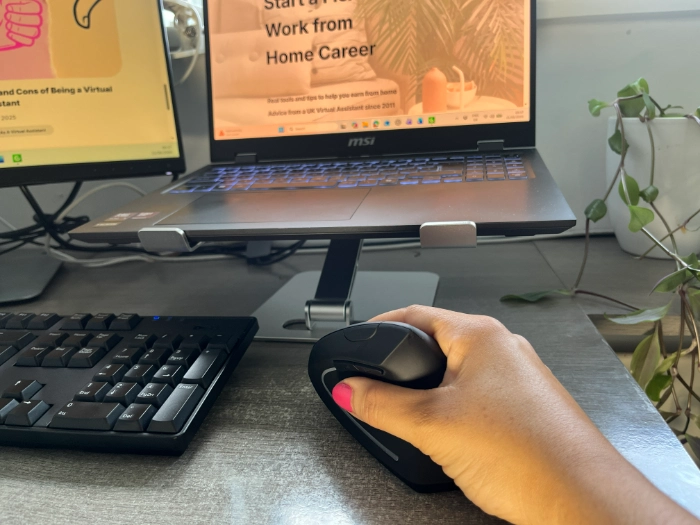
If you're wondering are ergonomic mice worth it, this Anker ergonomic mouse review shares my experience after using one every day for work. I wasn't expecting any major benefits when I bought this vertical ergonomic mouse, but after a few weeks I realised it was more comfortable to use than a traditional mouse.
Why I Bought a Vertical Ergonomic Mouse
When my old mouse stopped working, I needed a replacement. I'd seen a vertical ergonomic mouse before and was curious whether it would be more comfortable to use, so I decided to give one a try. I wasn't buying it because I was in pain or struggling. I wanted to see how it compared to a standard mouse.
A few weeks later, I realised something had changed. The mild ache I'd occasionally felt in my right thumb had disappeared. It had never been severe and I only noticed it every now and then, so I'd assumed it was just one of those mid-life aches and pains that appear for no reason. It never crossed my mind that my old mouse could have been causing the problem.
My Anker Ergonomic Mouse Review
Unlike a traditional flat mouse, a vertical ergonomic mouse is designed to keep your hand in a natural position. Instead of twisting your wrist downwards, your hand sits at an angle, almost like you're shaking someone's hand. It felt slightly unusual for the first day or two, but I adapted quickly and now it feels normal.
Looking back, the pain was likely caused by the position my hand and thumb were sitting in throughout the day. Since switching to this ergonomic mouse, that ache has gone. My hand feels more relaxed when I'm working and I can comfortably use the mouse for long periods. That wasn't the reason I bought it, but it has turned out to be one of the main benefits.
Since switching to this mouse:
My thumb no longer hurts.
My hand feels more relaxed.
It is comfortable to use all day.
It was affordable compared to many other ergonomic options.
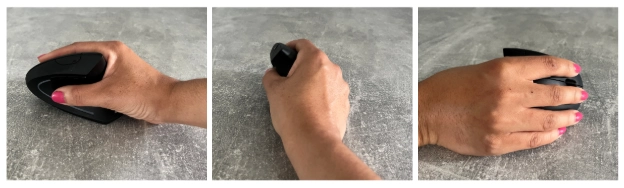
Image description: Different angles of the Anker vertical ergonomic mouse showing its natural hand position.
I bought the Anker ergonomic mouse because it wasn't expensive. I didn't want to spend a huge amount on something I wasn't sure about, so it felt like a sensible way to test whether an ergonomic mouse was right for me. I paid £16.99, making it an excellent budget ergonomic mouse.
If you'd like to try the same Anker ergonomic mouse that I've been using, you can check the latest price below.
What I Don't Like
No product is perfect and there are a couple of things I would change. The main issue is the raised peak on the mouse. The shape works well overall, but the highest point is quite high. Occasionally I catch it with my arm when moving around my desk. I think the design would be better if the peak was slightly more rounded.
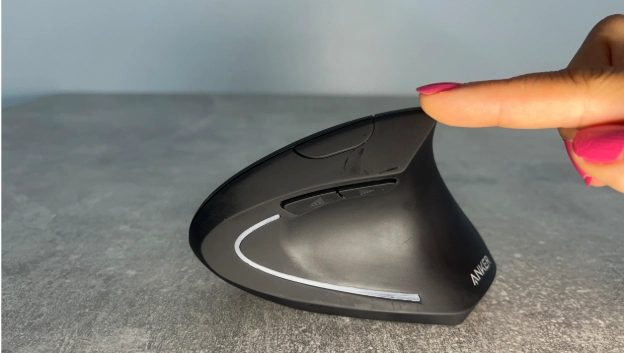
Image description: The raised peak on the Anker ergonomic mouse is higher than I'd like. I'd prefer a slightly more rounded design to stop my hand or sleeve catching on it when I am working.
I also find the mouse could be a little more sensitive. Every now and then I have to click an item more than once before it selects properly. It isn't a major problem, but it is something I have noticed during everyday use. I also have quite small hands, so this mouse fits me perfectly. If you have larger hands, you might find it a little too small.
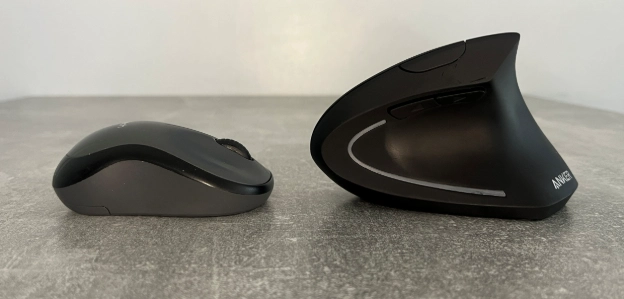
Image description: A standard mouse compared with the Anker vertical ergonomic mouse. The vertical design keeps your hand in a more natural position, making it a comfortable choice for office work and working from home.
Is This a Good Ergonomic Office Mouse for Working From Home?
For me, yes. The mouse wasn't expensive, it feels comfortable to use and it has reduced the ache that I didn't realise I had in my thumb. If you're looking for an ergonomic mouse for thumb pain or want something more comfortable for long hours at a computer, I think it's well worth considering. I noticed a difference within a couple of days.
What I'd Choose for My Next Ergonomic Office Mouse
If I bought another mouse in the future, I'd choose the Logitech Lift ergonomic mouse. I like the rounded support at the bottom of the mouse and the softer curved shape around the highest point, which I think would be even more comfortable for long days at my desk.
One thing I do know is that I'll never go back to using a standard mouse. For me, switching to an ergonomic mouse has made a noticeable difference.
If you want a more premium option, the Logitech Lift ergonomic mouse is the model I'd buy next for my next upgrade.
If you'd like to compare the Logitech Lift ergonomic mouse with the Anker mouse, you can view the latest price and full specifications below.
Final Verdict
Overall, this Anker ergonomic mouse review has been a positive one. I bought it because my old mouse broke and I wanted to try something different. What I didn't expect was for my thumb ache to disappear. While I would make a few small design improvements, particularly around the raised peak and click sensitivity, I still think it offers excellent value for money.
If you're looking for a budget ergonomic mouse to see whether a vertical mouse is right for you, I think the Anker mouse is an excellent place to start. Even if you don't currently have any pain or aches in your hand, it may help prevent some of the discomfort that can come from spending long hours at a desk.
FAQs
Q. Are ergonomic mice worth it?
Yes, based on my experience they are. I wasn't expecting much when I bought my Anker ergonomic mouse, but it quickly became more comfortable to use than my standard mouse and even helped with the mild thumb ache I'd been experiencing.
Q. Can an ergonomic mouse help with thumb pain?
In my case, yes. I didn't buy the mouse to solve thumb pain, but after switching to a vertical ergonomic mouse, the mild ache I'd occasionally noticed in my thumb disappeared within a few weeks.
Q. Is the Anker ergonomic mouse good value for money?
Yes. I paid £16.99 for mine, making it an affordable and budget ergonomic mouse. If you're interested in trying a vertical ergonomic mouse without spending a lot of money, I think it's a great place to start.
Q. Would you buy the Anker ergonomic mouse again?
I would happily recommend the Anker ergonomic mouse, but if I upgraded in the future I'd probably choose the Logitech Lift ergonomic mouse because I prefer its more rounded shape. That said, I'll never go back to using a standard mouse.
You might also like:
How I Upgraded My Work From Home Desk Setup for Under £50
My Work From Home Desk Setup: The Essentials I Use Every Day
-
Anker Ergonomic Mouse Review: Are Ergonomic Mice Worth It?
- Why I Bought a Vertical Ergonomic Mouse
- My Anker Ergonomic Mouse Review
- What I Don't Like
- Is This a Good Ergonomic Office Mouse for Working From Home?
- What I'd Choose for My Next Ergonomic Office Mouse
- Final Verdict
- FAQs