
How I Upgraded My Work From Home Desk Setup for Under £50
-
How I Upgraded My Work From Home Desk Setup for Under £50
- Why I Decided to Upgrade My Work From Home Desk Setup
- Why a Second Monitor Improved My Work From Home Setup
- Recycling My Old Desktop Computer
- Working in a Small Home Office
- Why I Chose a Second-Hand Dell UltraSharp Monitor
- Buying Second-Hand
- Why I Bought a Separate Wired Keyboard
- The Upgrade Was Much Easier Than I Expected
- What the Upgrade Cost
- Was It Worth It?
- Final Thoughts
- FAQs
How I Upgraded My Work From Home Desk Setup for Under £50
Upgrading my work from home desk setup was one of the best changes I've made.
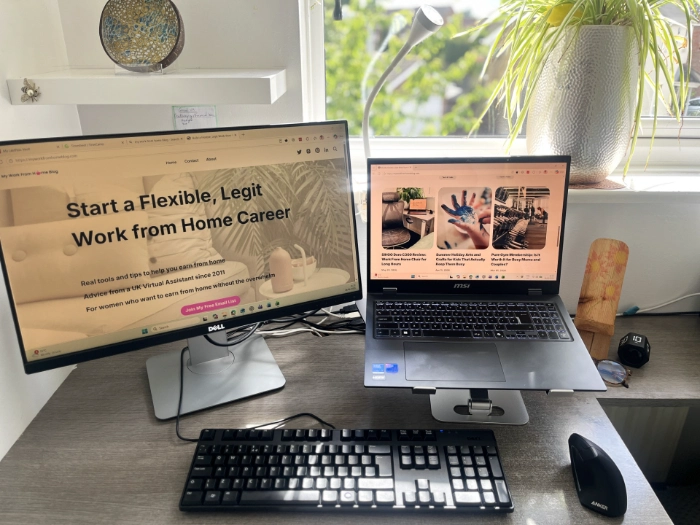
For less than £50, I added a second screen, improved my posture, reduced neck pain and created a much more comfortable workspace using mostly second-hand equipment. What I liked most was how simple and affordable the whole process turned out to be.
I've worked from home since 2011 and my work from home setup is based in a small spare bedroom. After years of using a single screen, I eventually switched to a dual monitor setup and quickly realised how much easier it made my working day.
In this blog, I'll explain why I made the change, how I set everything up and why I think it is one of the best upgrades for anyone working from home.
Why I Decided to Upgrade My Work From Home Desk Setup
For the first six months after buying my gaming laptop, I worked entirely from the laptop screen.
The laptop itself is fantastic. It's fast, reliable and handles everything I need for client work, bookkeeping, blog writing and content creation.
Read my blog: Why I Bought a Gaming Laptop for Work as a Virtual Assistant
The problem wasn't the laptop.
The problem was that I spent most of my day looking at a relatively small screen while juggling multiple tasks at once.
On a typical day, I might have Xero open for bookkeeping, Outlook open for emails, a Word document open for a client and Clio open for legal administration. Clio is legal practice management software used by solicitors to manage clients, matters, documents and communications.
I was constantly switching between applications.
I'd be checking the spelling of a client's name in one document, reviewing instructions in another and updating information somewhere else. None of these tasks were difficult, but they involved a lot of switching between windows.
One of my clients, a neurodiversity coach, had mentioned dual monitor setups several times and often spoke about how useful they were for both themselves and their clients. They always talked about how much easier it was to spread work across two screens instead of constantly switching between applications.
I assumed it was one of those nice-to-have upgrades that wasn't necessary.
Now I understand why so many people recommend them.
Why a Second Monitor Improved My Work From Home Setup
Earlier this year, I wrote a blog about reducing eye strain while working from home because I had been struggling with tired, uncomfortable eyes after long periods in front of a screen. Thankfully my eyes are much better now, but the experience made me realise how important it is to look after yourself when your job revolves around a computer.
Read my blog: How to Reduce Eye Strain From Computer Use (What Actually Helped Me).
At around the same time, I upgraded my office chair.
The new chair was more supportive than my previous one, but it also highlighted another issue. My laptop screen sat quite low on the desk, which meant I spent most of the day looking slightly downwards.
Read my blog: SIHOO Doro C300 Review: Work From Home Chair for Long Hours.
At first, I didn't think much of it.
Over time, I started noticing tension in my neck and shoulders. It wasn't severe, but it was enough to make me realise that if I want to continue working from home for many years to come, I need to take my workspace more seriously.
I've been a Virtual Assistant for a long time now. My children are older, my business is established and I spend a significant portion of my life sitting at my desk.
It finally felt like the right time to invest in a better work from home desk setup.
Recycling My Old Desktop Computer
One of the things I liked about this upgrade was that I didn't throw away good technology.
Before buying anything, I decided to sell my old desktop computer.
It had been sitting in my wardrobe gathering dust for months. Rather than leaving it there or sending it to landfill, I reset it to factory settings and took it to CeX.
I like the idea of recycling old technology whenever possible. Computers often have years of life left in them and someone else can make use of equipment that is no longer needed.
After inspecting the desktop, CeX offered me a £22 voucher, which I used towards the cost of my monitor and keyboard.
It's not a huge amount of money, but it felt much better than letting the computer sit unused.
If you're planning to upgrade your own workspace, it may be worth checking whether you can recycle an old desktop computer first. You might be surprised what you can put towards your next purchase.
Working in a Small Home Office
One challenge I faced throughout this upgrade was space.
My desk is only 94cm long and my office is a spare bedroom. When I first started researching monitors, I looked at several 27-inch models. While they looked impressive, I realised they would dominate my workspace.
I wanted a monitor that would improve my laptop and monitor setup without making my desk feel cramped.
After measuring everything, I decided that a 24-inch monitor would be a much better fit.
It would give me the additional screen space I wanted while still fitting comfortably within my small home office.
Sometimes bigger isn't better. In my case, choosing equipment that suited the available space was more important than buying the largest screen I could find.
Why I Chose a Second-Hand Dell UltraSharp Monitor
After doing some research, I decided on a second-hand Dell UltraSharp 24-inch monitor from CeX.
I chose Dell because it is a known brand in offices and workplaces. As someone who spends most of the day working from my home desk setup, I wanted something reliable that was designed for professional use rather than gaming or entertainment.
I choose an UltraSharp monitor because I had been experiencing eye strain from working on a laptop screen. These monitors are widely used by people who spend their day reading emails, documents and spreadsheets, which is exactly how I use my computer.
Another feature I liked was the adjustable stand. Being able to raise and lower the monitor meant I could position it at a comfortable height and reduce the strain on my neck and shoulders.
At £40, it felt like a reasonable investment and a simple way to improve my work from home setup.
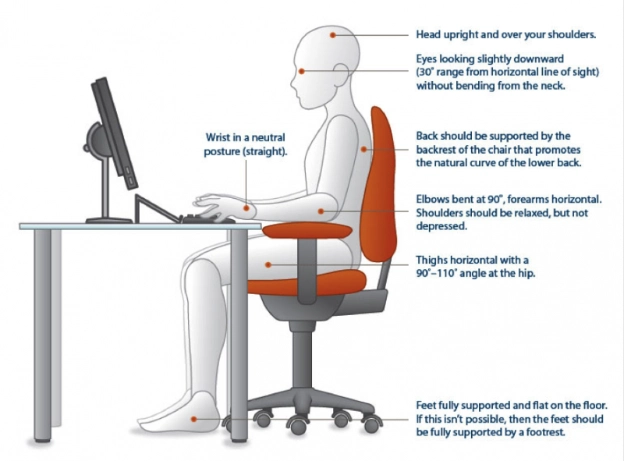
Image description: An example of an ergonomic work from home desk setup, showing the correct monitor height, chair position and posture to help reduce neck strain and improve comfort. Source.
Buying Second-Hand
I was slightly nervous about buying second-hand equipment, especially larger items like a monitor.
My main concern wasn't the condition of the items. It was how they would be packaged and whether they would survive being shipped without their original boxes.
I had nothing to worry about.
Both the monitor and keyboard arrived extremely well packaged and protected. Everything was securely wrapped inside sturdy boxes and arrived in excellent condition. The keyboard looked brand new when it arrived.
Buying a second-hand monitor allowed me to improve my work from home desk setup for a fraction of the cost of buying everything new. It also reinforced my belief that there is often plenty of life left in used technology.
Based on my experience, I wouldn't hesitate to buy second-hand equipment again.
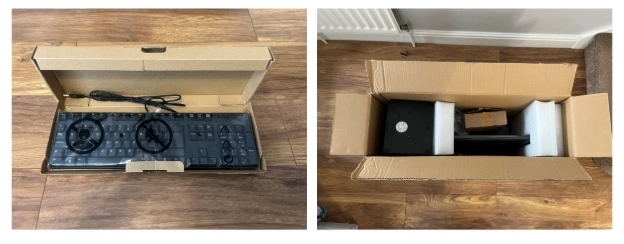
Image description: Well-packaged second-hand equipment for my dual monitor setup. The first image is my keyboard and the second image is the monitor and stand.
How a Laptop Stand Improved My Work From Home Desk Setup
I bought a simple aluminium laptop stand from Amazon to raise my laptop screen so it sat at a similar height to my monitor. Before that, my laptop sat flat on the desk, which meant I was constantly looking down.
By raising the laptop, I was able to create a more comfortable laptop and monitor setup. Both screens now sit within my natural line of sight, making it easier to spread my work across two displays.
My posture improved, my neck felt better and I found it much easier to work across multiple applications.
For such a simple piece of equipment, it has had a huge impact on my daily comfort.
If you're looking for a practical laptop stand for working from home, I would highly recommend considering one.
Why I Bought a Separate Wired Keyboard
Once I decided to raise my laptop onto a stand, I needed a separate keyboard.
I chose a Dell keyboard because it was affordable, included a full number pad and matched the Dell monitor. I also deliberately chose a wired keyboard. It stays on my desk permanently, so there is no need to worry about batteries or charging. When I'm working away from home, I use the keyboard built into my laptop.
I originally hoped the keyboard would feel exactly like typing on my MSI laptop.
It doesn't.
The keys are slightly noisier and chunkier than the slim laptop-style keys I'm used to. It took a little while to adjust and I may eventually upgrade to a quieter keyboard in the future.
That said, for £10 from CeX, it has been excellent value for money. It was listed as Grade A and looked brand new when it arrived.
Most importantly, it does exactly what I need it to do and has helped me create a comfortable dual monitor setup without spending a lot of money.
For anyone building a work from home setup on a budget, it proves that you don't always need the latest equipment to create a workspace that works well.
The Upgrade Was Much Easier Than I Expected
One of the things that stopped me upgrading my work from home desk setup sooner was the idea that it would be complicated.
When you're self-employed, you're often your own IT department. I assumed I would need an expensive docking station, specialist equipment and a lot of technical knowledge to create a dual monitor setup.
I also didn't have much experience with dual screens. When I worked in corporate offices many years ago, most people only had a single monitor, so I assumed setting up a dual screen setup would be much harder than it actually was.
When I bought my gaming laptop, I also bought an Anker USB hub because the laptop didn't have enough ports for my printer, mouse and other accessories. At the time, I didn't realise it would do everything I needed for my laptop and monitor setup.
The only additional item I needed was a HDMI cable to connect the monitor to the USB hub and I had a spare one at home.
After that, I connected the monitor, keyboard and printer to the hub. Once everything was plugged in, all I had to do was open Windows Display Settings and select "Extend these displays". This turned my laptop and monitor into two separate screens instead of showing the same image on both.
That was it.
I now have a much more comfortable work from home setup with two screens, better posture and enough screen space to keep multiple applications open at the same time.
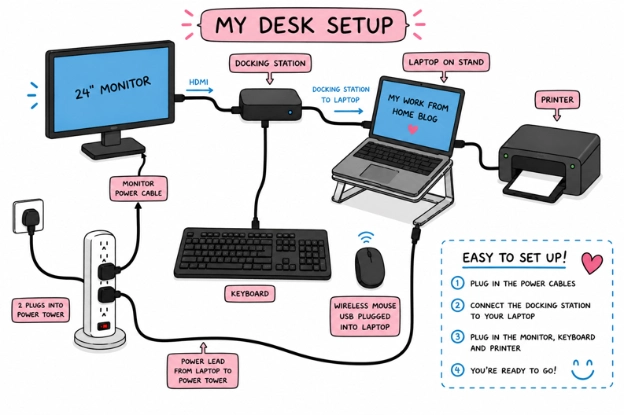
Image description: My dual monitor setup showing how my monitor, laptop, USB hub, keyboard and printer are connected.
What the Upgrade Cost
This upgrade didn't cost as much as I thought it would.
The Dell UltraSharp monitor cost £40, the keyboard cost £10 and delivery was £5.90. After using my £22 CeX voucher from selling my old desktop computer, the total came to just £33.90.
I also bought a laptop stand separately for around £16.
For roughly £50 in total, I upgraded my entire workstation.
If I hadn't sold my old desktop computer to CeX, the cost would have been closer to £70. Even so, I still think that would have been excellent value considering how much I use my desk every week.
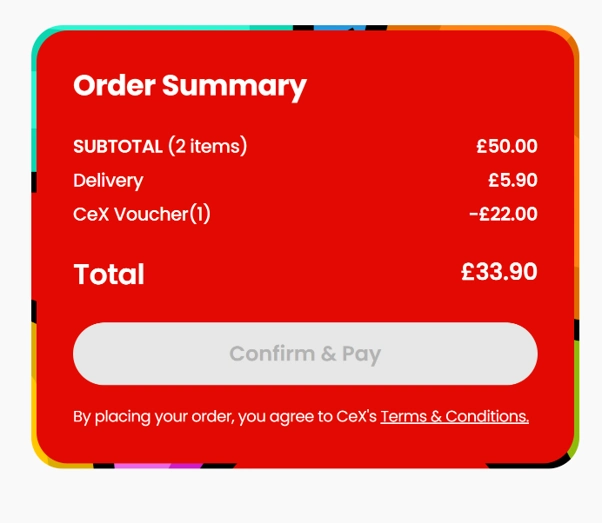
Image description: The monitor and keyboard cost just £33.90 from CEX, helping keep my work from home desk setup upgrade affordable.
Was It Worth It?
Absolutely.
The biggest improvement isn't speed or productivity.
It's comfort.
My workspace supports my back and my eyes and I have more space to spread my work across multiple screens. Tasks that involve comparing documents, checking information or working between different applications feel less frustrating than they did before.
I also find it easier to focus because I can keep important information visible rather than constantly switching between windows.
I understand why so many people recommend a dual monitor setup for people who work from home.
Final Thoughts
If you're considering upgrading your work from home desk setup, my advice is to focus on the things that will improve your daily experience.
You don't need the most expensive equipment.
You don't need a huge office.
You don't need a fancy setup that looks like it belongs in a YouTube studio.
What you do need is a workspace that feels comfortable, supports your posture and helps you do your job without unnecessary frustration.
For me, that meant adding a second monitor, raising my laptop to a better height and making use of good-quality second-hand equipment.
The total cost was around £50, much of which was offset by selling my old desktop computer.
Looking back, I wish I had done it sooner.
Sometimes the simplest upgrades make the biggest difference.
FAQs
Q. Is a dual monitor setup worth it for working from home?
Yes. A dual monitor setup makes it much easier to work across multiple applications without constantly switching between windows. I found it particularly useful for bookkeeping, emails, blog writing and legal administration tasks.
Q. How much does a work from home desk setup cost?
It depends on the equipment you choose. My work from home desk setup upgrade cost less than £50 because I bought a second-hand monitor and keyboard from CEX and used a voucher from selling my old desktop computer.
Q. Can I create a dual screen setup using second-hand equipment?
Absolutely. My dual screen setup uses a second-hand Dell UltraSharp monitor and a second-hand Dell keyboard from CEX. Both arrived in excellent condition and helped keep the overall cost low.
Q. Do I need a laptop stand for a laptop and monitor setup?
A laptop stand is not essential, but I found it made a difference. Raising my laptop screen helped create a comfortable laptop and monitor setup, improved my posture and reduced the amount of time I spent looking down at my desk.
You might also like:
Anker Ergonomic Mouse Review: Are Ergonomic Mice Worth It?
SIHOO Doro C300 Review: Work From Home Chair for Long Hours
My Work From Home Desk Setup: The Essentials I Use Every Day
-
How I Upgraded My Work From Home Desk Setup for Under £50
- Why I Decided to Upgrade My Work From Home Desk Setup
- Why a Second Monitor Improved My Work From Home Setup
- Recycling My Old Desktop Computer
- Working in a Small Home Office
- Why I Chose a Second-Hand Dell UltraSharp Monitor
- Buying Second-Hand
- Why I Bought a Separate Wired Keyboard
- The Upgrade Was Much Easier Than I Expected
- What the Upgrade Cost
- Was It Worth It?
- Final Thoughts
- FAQs