
Why I Bought a Gaming Laptop for Work as a Virtual Assistant
-
Why I Bought a Gaming Laptop for Work as a Virtual Assistant
- Why I Chose an MSI Laptop for Business Instead of a Standard Office Laptop
- Why This Gaming Laptop for Work Handles Multitasking So Well
- Gaming Laptop vs Office Laptop: What I Noticed Immediately
- How This Work From Home Laptop Improved My Stress Levels
- Why I Wanted a Laptop I Could Take Anywhere
- Is the MSI Gaming Laptop Heavy?
- Battery Life
- Eye Strain and Display Settings
- What I Like About This MSI Laptop for Business
- The Downsides of Using a Gaming Laptop for Work
- Setting Up This Work From Home Laptop Was Easier Than Expected
- FAQs:
Disclosure: Some of the links in this article may be affiliate links, which can provide compensation to me at no cost to you if you decide to purchase. This site is not intended to provide financial advice and is for entertainment only.
Why I Bought a Gaming Laptop for Work as a Virtual Assistant
My old desktop PC had become painfully slow. Updates took forever, Microsoft Teams constantly froze and some mornings I had to switch the computer on 30 minutes early just to get it working properly.
As a Virtual Assistant working from home, I rely on my computer for everything. Microsoft Teams calls, Canva, Outlook, Excel, Word, PowerPoint, Zoom and multiple browser tabs are all part of my normal workday. Eventually, my old desktop simply could not keep up anymore.
At the same time, I realised I no longer needed to be tied to one desk in one room all day. My children are older now and I wanted the flexibility to work from coffee shops, move around the house and change my environment occasionally instead of sitting in the same office every day.
That is what pushed me to finally upgrade to an MSI gaming laptop for work.
Why I Chose an MSI Laptop for Business Instead of a Standard Office Laptop
It was my clients who convinced me to look at gaming laptops. Several of them mentioned they had used gaming laptops for years because they stayed fast and reliable for much longer than standard office laptops. They said cheaper laptops often slow down over time, especially when you run multiple programs all day. That is exactly what happened to my desktop.
That made me start researching an MSI laptop for business use rather than a traditional office laptop. After a lot of research, advice from my teenage son, checking reviews and even running options through AI tools, I eventually chose the MSI Prestige 16 AI+ Evo from MSI and bought it from Currys for around £1,800.
This is the model I bought:
MSI Prestige 16 AI+ Evo 16" Laptop
Intel® Core™ Ultra 9 processor
32 GB RAM
1 TB SSD
4K Ultra HD OLED screen
Windows 11
Up to 9 hours battery life
I do not fully understand every technical specification. I mainly cared about buying something powerful, reliable and fast enough for long working days that would last.
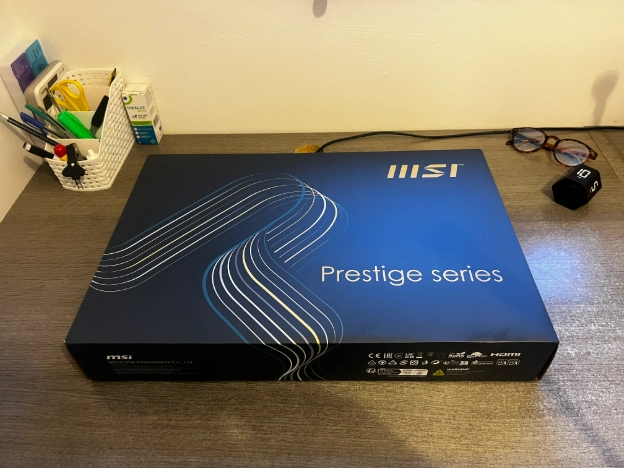
Image description: The MSI Prestige 16 AI+ Evo gaming laptop I chose for my work from home setup before opening and setup. I wanted a powerful laptop for multitasking, blogging, Microsoft Teams calls, freelance work and long working days as a Virtual Assistant.
Why This Gaming Laptop for Work Handles Multitasking So Well
I am not using this laptop for heavy video editing or gaming. Most days I simply log in and out of different programs like:
Microsoft Teams
Canva for design work
Outlook with multiple email accounts
Word and Excel
PowerPoint presentations
Occasional Zoom calls
One thing I noticed immediately was how smoothly Microsoft Teams runs compared to my old desktop. On my previous computer, Teams almost felt like it was choking the entire system. Sometimes calls would freeze, load slowly or crash completely.
On this laptop, Teams opens quickly and runs smoothly alongside everything else. The fan does kick in when Teams is running because Teams is a heavy program, but performance-wise I have had no problems at all. As a laptop for multitasking, it has been a massive improvement.
Gaming Laptop vs Office Laptop: What I Noticed Immediately
The speed difference was noticeable immediately. The laptop boots up very quickly, programs load almost instantly and I no longer sit staring at loading screens while trying to work.
When you work online all day, a slow computer slowly drains your energy without you realising it. You lose time constantly waiting for your PC to respond. This gaming laptop for work feels smooth and responsive, which genuinely makes working from home less stressful.
It also handles heavier workloads easily. By “heavy workloads”, I mean having Teams, Outlook, PowerPoint, browser tabs and emails all open together at the same time without freezing or slowing down.
How This Work From Home Laptop Improved My Stress Levels
This laptop is reliable. I switch the laptop on and it works properly. No black screens. No endless loading. No freezing during client calls. My old desktop had become stressful to use. It got so slow that even clients started noticing delays during Teams calls.
I think slow technology affects your mood and productivity more than people realise. When your computer struggles all day, it creates constant low-level frustration in the background.
This work from home laptop removed that stress for me.
Why I Wanted a Laptop I Could Take Anywhere
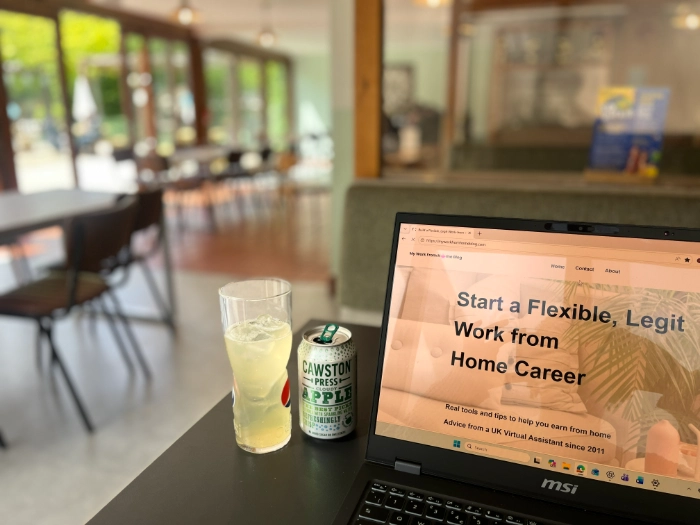
One of the main reasons I wanted a laptop was flexibility. I have already started taking it to coffee shops, which feels strange after years of being completely home-based while raising younger children. When your children are small, you build your entire work life around being at home. Once they get older, it feels like a shift to suddenly realise you can work elsewhere if you want to.
I actually enjoy changing environments now occassionally. Working somewhere different feels mentally lighter and less draining than sitting in the same room every single day. For me, that has been one of the biggest benefits of finally buying a laptop instead of relying on a desktop setup.
Is the MSI Gaming Laptop Heavy?
Not particularly. I carry it in a backpack without any issues. I am sure there are lighter laptops available, but for me performance mattered more than having the thinnest possible device. I would rather have a slightly heavier laptop that works properly than an ultra-light one that struggles after two years. I am also only working locally so I do not carry it around for hours.
Battery Life
The battery life is advertised as up to 9 hours. I normally work in my home office with the laptop plugged in, so I have not fully drained the battery yet. However, for coffee shop working or moving around the house, the battery has been more than enough for me so far.
Eye Strain and Display Settings
One thing I changed immediately was the screen scaling. I increased the text size from 250% to 350% because I struggle with eye strain from computer work. I’ve written more about reducing eye strain while working from home here: How to Reduce Eye Strain From Computer Use (What Actually Helped Me).
Making the text larger instantly improved comfort during long workdays. The 4K OLED screen on this MSI laptop is incredibly sharp, bright and clear. I will say the screen is glossy and reflective when the laptop is switched off and can almost look like a mirror. However, once the laptop is turned on, you barely notice it, particularly when using lighter screens like Word or web browsing. It certainly has not been an issue for me using this gaming laptop at home or in coffee shops.
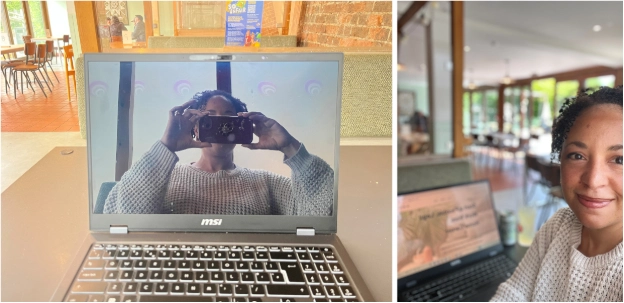
Image description: The glossy OLED screen on my MSI gaming laptop for work when the laptop is turned off compared to being used normally in a coffee shop for remote work and blogging.
What I Like About This MSI Laptop for Business
Face ID Login
I absolutely love the facial recognition login. You open the laptop, turn it on and it recognises your face almost instantly. It is quick, simple and surprisingly useful when you log in multiple times a day.
Speed and Reliability
Everything simply feels fast. Programs load quickly, Teams works properly and the laptop handles multitasking easily without struggling.
Flexibility
Being able to work away from my desk has probably been one of the biggest lifestyle improvements.
The Downsides of Using a Gaming Laptop for Work
No laptop is perfect and there are a few things I do not love.
The Fan Is Noisy
When the fan kicks in, it is definitely noticeable. It is not unbearable, but it is louder than a standard office laptop.
The Keyboard Feels Slightly Flimsy
The keyboard is perfectly usable, but it does not feel particularly premium.
Not Enough USB Ports
I had to buy a separate USB hub because there were not enough USB ports built into the laptop itself. That seems fairly common with modern laptops now though.
The Camera Cover Feels Flimsy
The built-in camera privacy cover feels a little flimsy and if the cover is closed then the Face ID login obviously does not work.
I Could Not Get the Fingerprint Reader Working
I may not have set it up correctly, but I never managed to get the fingerprint touch feature working properly and I don’t really need this feature. The Face ID works well so it’s not an important feature to me.
Setting Up This Work From Home Laptop Was Easier Than Expected
The setup process was surprisingly straightforward.
I mainly just needed to:
Log back into Microsoft
Reconnect Outlook and Gmail accounts
Reinstall my usual programs and tools
Windows 11 was already installed, although the laptop did need to complete a big update when I first bought it.
After that, everything was up and running quickly.
Do You Need an Expensive Laptop for Freelancers or Virtual Assistants?
Definitely not. I did not start with an expensive laptop but have upgraded over the years. My previous desktop only cost around £600 and lasted four years, which is not bad considering I used it every single day. I upgraded gradually as my business grew and that is the approach I would recommend to most people. Start with what you can afford. Upgrade once your business income supports it.
Was £1,800 Worth It?
For me, yes. When your computer is your income source, investing in reliable technology makes a difference to your daily stress levels and productivity. I also understand that technology does not last forever. I will probably need to replace this laptop in around six years and I am okay with that now. I do wish technology lasted a lifetime, but realistically it does not. If you work from home full-time, it is important to include a technology replacement budget within your business planning.
Would I Recommend a Gaming Laptop for Work and Productivity?
Absolutely. If you are sick of dealing with a slow computer, freezing Teams calls, endless updates and constant frustration, I genuinely think a gaming laptop for work is worth considering. However, I would only recommend spending this kind of money once your business is profitable. Do not go into debt trying to create the “perfect” Virtual Assistant setup when you are brand new. Focus on getting your first few clients. Upgrade later when your income supports it. For me, this MSI gaming laptop has made working from home feel smoother, quicker and much less stressful and not hearing my old desktop struggle every time Microsoft Teams opens has been worth the upgrade alone.
FAQs:
Q. Is a gaming laptop good for Virtual Assistant work?
Yes. Gaming laptops are often powerful enough to handle Microsoft Teams, Outlook, Canva, browser tabs and multitasking without slowing down.
Q. Do you need a gaming laptop to become a Virtual Assistant?
No. A basic reliable laptop is enough to get started. You can upgrade later as your business grows.
Q. Why are gaming laptops faster for work?
Gaming laptops usually have stronger processors, more RAM and better cooling systems, which helps them handle multiple programs smoothly.
Q. Is the MSI Prestige 16 good as a work from home laptop?
For me, yes. It has been fast, reliable and powerful enough for everything I use daily as a Virtual Assistant.
Q. What is the downside of gaming laptops?
They can be expensive, slightly heavier than normal laptops and sometimes noisier because of the cooling fans.
You might also like:
SIHOO Doro C300 Review: Work From Home Chair for Long Hours
My Work From Home Desk Setup: The Essentials I Use Every Day
-
Why I Bought a Gaming Laptop for Work as a Virtual Assistant
- Why I Chose an MSI Laptop for Business Instead of a Standard Office Laptop
- Why This Gaming Laptop for Work Handles Multitasking So Well
- Gaming Laptop vs Office Laptop: What I Noticed Immediately
- How This Work From Home Laptop Improved My Stress Levels
- Why I Wanted a Laptop I Could Take Anywhere
- Is the MSI Gaming Laptop Heavy?
- Battery Life
- Eye Strain and Display Settings
- What I Like About This MSI Laptop for Business
- The Downsides of Using a Gaming Laptop for Work
- Setting Up This Work From Home Laptop Was Easier Than Expected
- FAQs:
Disclosure: Some of the links in this article may be affiliate links, which can provide compensation to me at no cost to you if you decide to purchase. This site is not intended to provide financial advice and is for entertainment only.