
TimeCamp Review: How I Track Client Hours as a Virtual Assistant

-
TimeCamp Review: How I Track Client Hours as a Virtual Assistant
- Who Is TimeCamp Best For?
- How Does TimeCamp Work?
- How Do I Track My Time in TimeCamp?
- How I Use TimeCamp to Track Billable Hours
- Can TimeCamp Reports Help With Invoicing?
- Do Clients Require Time Tracking or Is It Your Choice?
- Is the Free Version of TimeCamp Enough?
- Why Did I Move Back to TimeCamp?
- What I Like About TimeCamp (Pros)
- What I Don’t Like About TimeCamp (Cons)
- Alternatives to TimeCamp
- Is TimeCamp Worth It for Virtual Assistants?
- FAQs
TimeCamp Review: How I Track Client Hours as a Virtual Assistant
If you’re looking for a TimeCamp review from someone who uses the software, I’ve used TimeCamp for years to track my client hours as a Virtual Assistant.
I use TimeCamp to manage multiple clients, track my billable hours and make sure my invoices are accurate each month. For me, it’s simple, accurate and reliable, which is exactly what I need from time tracking software.
I like being able to see exactly how much time I've spent on each client and individual task. At the end of the month, TimeCamp automatically totals my hours, which makes raising my invoices much easier.
Who Is TimeCamp Best For?
TimeCamp works well for:
Virtual Assistants
Freelancers
Bookkeepers
Social media managers
Small business owners
Anyone charging hourly for client work
If you regularly switch between tasks and clients throughout the day, using time tracking software removes the mental load of trying to remember what you worked on or using pen and paper. It also makes invoicing much easier.
How Does TimeCamp Work?
I use TimeCamp every day to track my client work. At the start of each month, I create a new folder for that month. Inside the folder, I create a project for each client and then add individual tasks under each client project.
A lot of my work repeats monthly, such as LinkedIn content, newsletters and admin tasks, so I usually set these tasks up at the beginning of the month. That way, when I sit down at my desk, everything is ready to go and I can start tracking immediately instead of wasting time setting tasks up every day.
I can also add tasks for ad hoc projects throughout the month, so it's easy to keep everything organised as new work comes in.
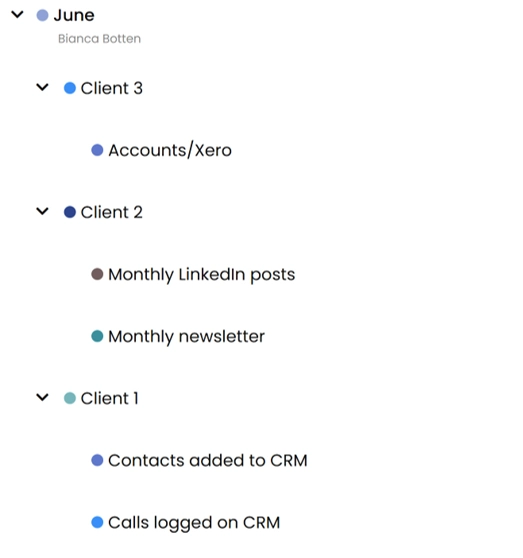
Image description: My monthly TimeCamp setup with client folders and recurring tasks ready for time tracking.
How Do I Track My Time in TimeCamp?
Once everything is set up, tracking time is very simple. I click into the Timesheet tab, which takes me to the current day. From there, I select the folder, choose the client, pick the task and press the green start button. That’s it.
TimeCamp is intuitive and easy to use. If you spend a little time clicking around and testing the features, you’ll pick it up quickly.
In the example below, you can see how my time is logged for different clients throughout the day. TimeCamp records the start and finish times for each task and automatically totals the hours worked.
Some days are very structured and focused. Other days are less organised, especially when I get interrupted or switch between tasks frequently. I can stop and start the timer as often as needed without losing track of my time.
If you forget to stop a timer, you can edit it afterwards. For example, if the timer kept running but I know I stopped working at 3pm, I can manually adjust the entry and my totals update automatically.
In the example below, I tracked 4 hours and 42 minutes of paid client work for the day.
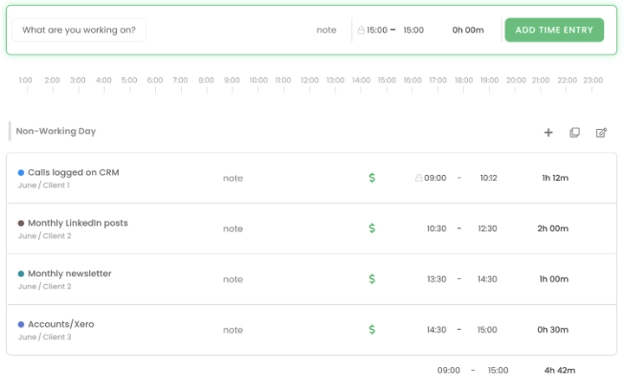
Image description: My TimeCamp timesheet showing how I track billable hours, newsletters, LinkedIn content and bookkeeping work for different clients.
How I Use TimeCamp to Track Billable Hours
One of the biggest reasons I use TimeCamp is to track billable hours accurately. When you work with multiple clients, it’s very easy to lose track of time, especially if you switch between tasks all day. Before using TimeCamp, I tracked my hours using paper and pen. That quickly became frustrating because I constantly had to write down start and stop times and manually add everything together. Now I simply start the timer, focus on the work and let the software track everything in the background.
This makes it much easier to:
Track billable hours
Understand how long tasks take
Price work more accurately
Send accurate invoices
Give clients clear time breakdowns
If you’re wondering how to track billable hours as a Virtual Assistant or freelancer, TimeCamp makes the process much easier than tracking your hours manually.
Can TimeCamp Reports Help With Invoicing?
The reporting feature is one of the most useful parts of TimeCamp. Instead of trying to remember what you worked on during the month, the software already has everything recorded and organised for you. It shows exactly how much time was spent on each client and each task.
In the example below, you can see how my time is grouped by client with individual tasks listed underneath. This makes time tracking and invoicing much easier because I can clearly see what work has been completed and how long it took.
The reports also help you understand where your time is going each month. You can quickly identify which clients or tasks are taking up most of your working hours. Some of my clients ask for weekly time updates, so I regularly run these reports to send them an accurate breakdown of hours worked by email.
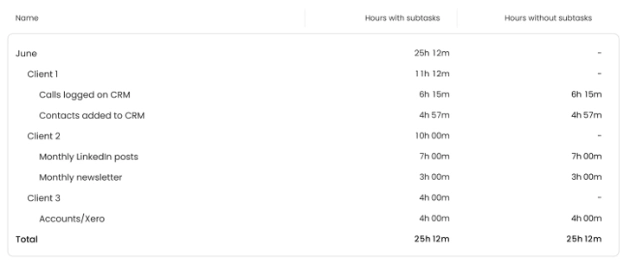
Image description: A TimeCamp report showing tracked hours by client and task, making invoicing and monthly reporting much easier.
Do Clients Require Time Tracking or Is It Your Choice?
For me, time tracking is my choice, but clients value it. I charge hourly for my work, so accurate time tracking is essential for invoicing properly. When I start working with a new client, they usually appreciate seeing exactly how long tasks take because it helps them understand where their time and budget are going. It also builds trust.
I don’t track my own admin or marketing time in TimeCamp. I use it specifically to track paid client work and billable hours.
Is the Free Version of TimeCamp Enough?
I used the free version of TimeCamp for a long time and found it was more than enough for tracking my client hours. If you’re looking for free time tracking software as a beginner Virtual Assistant or freelancer, I think the free version is a great starting point. You can create projects, tasks, run the timer and generate reports without paying monthly fees.
For many freelancers and small businesses, the free plan may be enough for quite a long time.
Why Did I Move Back to TimeCamp?
I switched from pen and paper to TimeCamp to track my client hours, starting with the free version before eventually upgrading to a paid plan. I wanted to track my hours and raise my invoices within the same software, automating more of my business admin.
I later started using FreeAgent on the advice of my accountant, which I still use today for my bookkeeping and invoicing. For a couple of years, I also used FreeAgent to track my client hours, but I found the time tracking frustrating and eventually decided to move back to TimeCamp.
I now use the two together. I use TimeCamp purely for tracking my client hours and at the end of each month, I use my TimeCamp reports to manually raise accurate invoices in FreeAgent. FreeAgent handles my business bookkeeping and invoicing, while TimeCamp does the job I think it does best – tracking my time.
I've been using the free version of TimeCamp since moving back, but I've now reached the point where I'm considering upgrading again. I'll cover why in a separate blog.
What I Like About TimeCamp (Pros)
It has been accurate and reliable for me
I can clearly see the start and finish times for each task
The platform is intuitive and easy to use
I can break work into individual tasks and see exactly how long each job takes
The timer continues running in the background even if I close my browser
It really helps with time blindness and understanding how long tasks take
There’s a mobile app available, although I mainly use the desktop version
I don’t need to constantly think about the clock while I’m working. I simply start the timer and focus on the task
What I Don’t Like About TimeCamp (Cons)
There are a few downsides to TimeCamp, but none have been major enough to stop me using it.
The main issue with the free version is that I can’t archive old projects. After using TimeCamp for a long time, this means my workspace has become cluttered with old clients, projects and tasks.
I also manually set up my folders, clients and tasks each month. It would be useful if I could copy the previous month and delete anything I no longer want to track, but this isn’t currently an option. Setting up my client folders and projects doesn’t take long and I find it useful for getting organised for the month ahead.
There was an automatic pop-up window that appeared when my computer started up. It was designed to make tracking faster, but I found it confusing, so I stopped it from automatically opening when I turned my PC on.
Another downside for me is that TimeCamp doesn’t integrate directly with FreeAgent. I use my TimeCamp monthly reports to build my invoices manually in FreeAgent. It works well, but a direct integration would make the process quicker.
Alternatives to TimeCamp
The only other time tracking software I’ve personally used is FreeAgent, but I found the time tracking frustrating. Old time entries sometimes pulled through onto new invoices, which made me lose confidence in the accuracy. That’s one of the main reasons I went back to TimeCamp. For me, TimeCamp has been much more reliable for tracking client hours.
I know a lot of business owners and Virtual Assistants use Toggl Track and seem to like it, but I haven’t tested it myself, so I can't compare the two from personal experience. I may review Toggl Track in the future once I've had the chance to try it properly.
Is TimeCamp Worth It for Virtual Assistants?
For me, yes. TimeCamp is simple, reliable and does exactly what I need it to do. It helps me accurately track client work and understand where my working hours are being spent each month.
If you’re looking for time tracking software for Virtual Assistants or freelancers, I think TimeCamp is definitely worth considering, especially if you charge hourly or work across multiple clients.
If you’re still tracking your hours using paper, spreadsheets or memory, switching to dedicated time tracking software can make the process much easier. TimeCamp has helped me stay organised, invoice accurately and understand where my time goes. For a busy Virtual Assistant juggling multiple clients, that’s incredibly valuable.
If you want to try TimeCamp for yourself, you can test the free version below and see if it works for your business.
FAQs
Q. Is TimeCamp free?
Yes. TimeCamp offers a free plan with time tracking, projects and reporting features, making it a useful option for Virtual Assistants and freelancers who want to track their client hours.
Q. Can TimeCamp track billable hours?
Yes. TimeCamp lets you track billable hours by client, task or project and automatically calculates the total time worked. I use the totals from my TimeCamp reports to raise my client invoices in FreeAgent.
Q. Is TimeCamp good for Virtual Assistants?
Yes. As a Virtual Assistant, I've found TimeCamp works well for managing my own client hours. I use it to track individual tasks, billable hours and the time I spend working for each client.
Q. Can you edit time entries in TimeCamp?
Yes. If you forget to stop a timer or make a mistake, you can manually edit the time and date of your TimeCamp entries afterwards.
You might also like:
Why I Use FreeAgent Accounting Software as a Work From Home Virtual Assistant
Top 10 Virtual Assistant Tools (Free + Paid)
My Work From Home Desk Setup: The Essentials I Use Every Day
-
TimeCamp Review: How I Track Client Hours as a Virtual Assistant
- Who Is TimeCamp Best For?
- How Does TimeCamp Work?
- How Do I Track My Time in TimeCamp?
- How I Use TimeCamp to Track Billable Hours
- Can TimeCamp Reports Help With Invoicing?
- Do Clients Require Time Tracking or Is It Your Choice?
- Is the Free Version of TimeCamp Enough?
- Why Did I Move Back to TimeCamp?
- What I Like About TimeCamp (Pros)
- What I Don’t Like About TimeCamp (Cons)
- Alternatives to TimeCamp
- Is TimeCamp Worth It for Virtual Assistants?
- FAQs